> ## Documentation Index
> Fetch the complete documentation index at: https://docs.robosite.gr/llms.txt
> Use this file to discover all available pages before exploring further.
# robosite Tool
> Learn how to use robosite triggers and actions in your AI calling flows
# robosite Tool
The robosite tool is the core component that connects your AI calling system with automation flows. It enables real-time data exchange between your AI assistants and business systems, allowing for personalized conversations and automated follow-ups.
You can find the robosite tool prominently displayed at the top of the
searching sidebar when looking for either triggers or actions.
## Triggers
### Call Ended
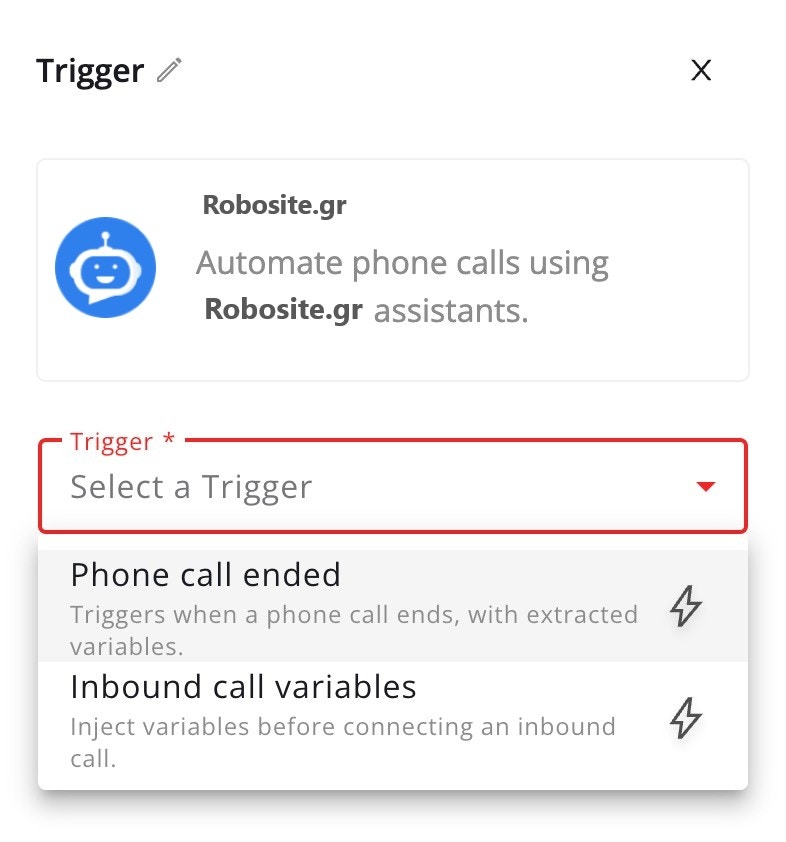 The Call Ended trigger activates immediately after an AI call completes, providing comprehensive data about the interaction:
* Complete conversation transcript with timestamps
* AI assistant responses and decisions
* Call duration and technical metadata
* Customer information and phone number
* Call outcome and sentiment analysis
* Variables set during the conversation
#### Configuration
1. Select "Call Ended" as your trigger
2. Choose specific AI assistant to monitor
3. Configure variable mapping
### Inbound Call Variable Injection
This powerful trigger activates before your AI assistant picks up an inbound call, allowing you to:
* Fetch and inject real-time customer data
* Customize AI behavior based on context
* Set conversation parameters
* Define AI personality traits
* Provide business logic variables
#### Configuration
1. Select "Inbound Call" as your trigger
2. Define required variables for AI context
## Actions
### Add Lead to Campaign
The Call Ended trigger activates immediately after an AI call completes, providing comprehensive data about the interaction:
* Complete conversation transcript with timestamps
* AI assistant responses and decisions
* Call duration and technical metadata
* Customer information and phone number
* Call outcome and sentiment analysis
* Variables set during the conversation
#### Configuration
1. Select "Call Ended" as your trigger
2. Choose specific AI assistant to monitor
3. Configure variable mapping
### Inbound Call Variable Injection
This powerful trigger activates before your AI assistant picks up an inbound call, allowing you to:
* Fetch and inject real-time customer data
* Customize AI behavior based on context
* Set conversation parameters
* Define AI personality traits
* Provide business logic variables
#### Configuration
1. Select "Inbound Call" as your trigger
2. Define required variables for AI context
## Actions
### Add Lead to Campaign
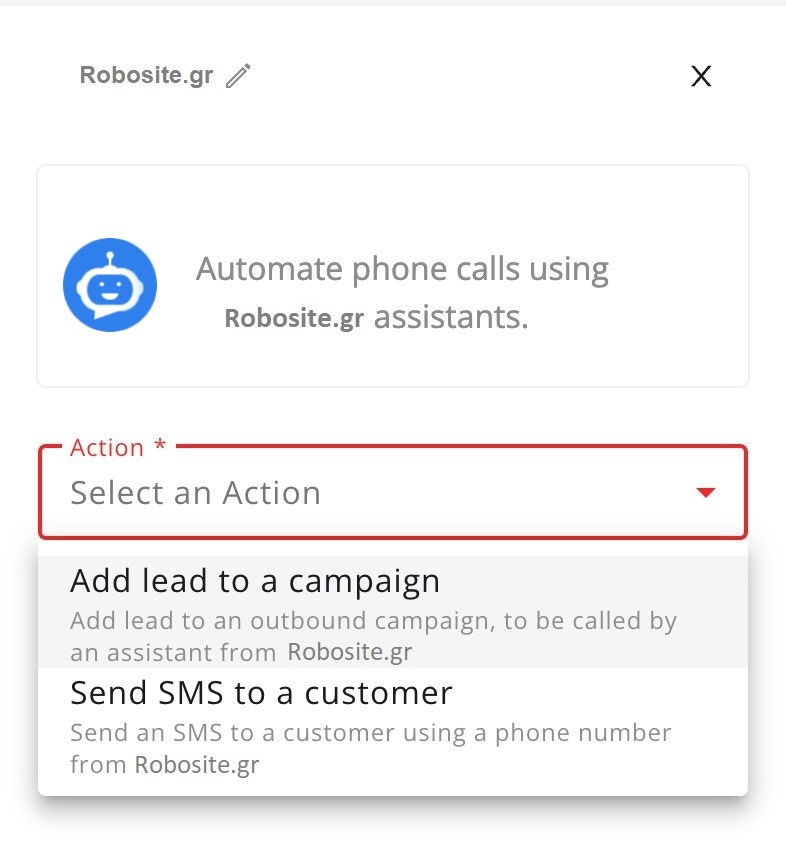 This action helps manage your AI calling campaigns by:
* Creating new leads from extenal tools like Sheets, Hubspot, Facebook leads
* Assigning leads to specific AI campaigns
* Adding context for future calls
#### Configuration
1. Select target AI campaign
2. Map contact details from trigger data
3. Add custom attributes for AI context
### Return Variables
This action is crucial for inbound calls, returning context that gets injected into the AI's prompt:
* Customer profile and preferences
* Conversation history summary
* Business rules and constraints
* Custom AI behavior flags
* Dynamic response templates
#### Configuration
1. Structure response JSON
2. Map customer data to variables
3. Set AI conversation parameters
4. Configure timeout handling
## Example Usage
### Post-Call Lead Management
```javascript theme={null}
Trigger: AI Call Ended
↓
Extract conversation insights
↓
Update Hubspot record
↓
Add to follow-up campaign if qualified
```
### Intelligent Inbound Routing
```javascript theme={null}
Trigger: Inbound Call to AI
↓
Fetch customer profile from CRM
↓
Get interaction history
↓
Return enriched context for AI prompt
```
## Best Practices
1. **Variable Injection Performance**
* Keep processing under 2 seconds
* Set sensible defaults
2. **Data Structure**
* Follow AI prompt requirements
* Validate all variables
* Structure nested objects clearly
* Document custom fields
3. **Error Handling**
* Provide fallback values
* Log injection failures
* Monitor response times
* Handle missing data gracefully
This action helps manage your AI calling campaigns by:
* Creating new leads from extenal tools like Sheets, Hubspot, Facebook leads
* Assigning leads to specific AI campaigns
* Adding context for future calls
#### Configuration
1. Select target AI campaign
2. Map contact details from trigger data
3. Add custom attributes for AI context
### Return Variables
This action is crucial for inbound calls, returning context that gets injected into the AI's prompt:
* Customer profile and preferences
* Conversation history summary
* Business rules and constraints
* Custom AI behavior flags
* Dynamic response templates
#### Configuration
1. Structure response JSON
2. Map customer data to variables
3. Set AI conversation parameters
4. Configure timeout handling
## Example Usage
### Post-Call Lead Management
```javascript theme={null}
Trigger: AI Call Ended
↓
Extract conversation insights
↓
Update Hubspot record
↓
Add to follow-up campaign if qualified
```
### Intelligent Inbound Routing
```javascript theme={null}
Trigger: Inbound Call to AI
↓
Fetch customer profile from CRM
↓
Get interaction history
↓
Return enriched context for AI prompt
```
## Best Practices
1. **Variable Injection Performance**
* Keep processing under 2 seconds
* Set sensible defaults
2. **Data Structure**
* Follow AI prompt requirements
* Validate all variables
* Structure nested objects clearly
* Document custom fields
3. **Error Handling**
* Provide fallback values
* Log injection failures
* Monitor response times
* Handle missing data gracefully